Wireless CarPlay for Motorcycle: The Complete Guide for Riders
Wireless CarPlay for motorcycle use gives riders access to navigation, calls, messages, music, and supported iPhone apps through a dedicated display. The phone can remain stored in a pocket, jacket, or tank bag instead of being mounted directly on the handlebars.
For riders who regularly use navigation, that can mean less phone handling, fewer cables around the cockpit, and a more consistent setup before each ride. However, wireless CarPlay is not automatically the right choice for every motorcycle or every rider.
This complete guide explains how motorcycle wireless CarPlay works, what it can do, how it compares with a phone mount, what installation requires, which limitations matter, and what to check before choosing a display.
- What wireless CarPlay for motorcycle means
- How motorcycle CarPlay works
- What riders can do with CarPlay
- CarPlay screen vs phone mount vs integrated system
- Main benefits for riders
- Limitations and compatibility
- Installation, power, and mounting
- How to choose a motorcycle CarPlay display
- Whether motorcycle CarPlay is worth it
- Frequently asked questions

What Is Wireless CarPlay for Motorcycle?
Wireless CarPlay for motorcycle use connects a compatible iPhone to a dedicated motorcycle display. The screen provides a simplified interface for supported navigation, audio, calling, messaging, and voice-control functions while the phone remains stored away.
It is important to understand that CarPlay is not ordinary phone screen mirroring. It does not display every app installed on the iPhone. Instead, compatible apps appear through an interface designed to make essential functions easier to access while travelling.
A motorcycle CarPlay setup normally includes:
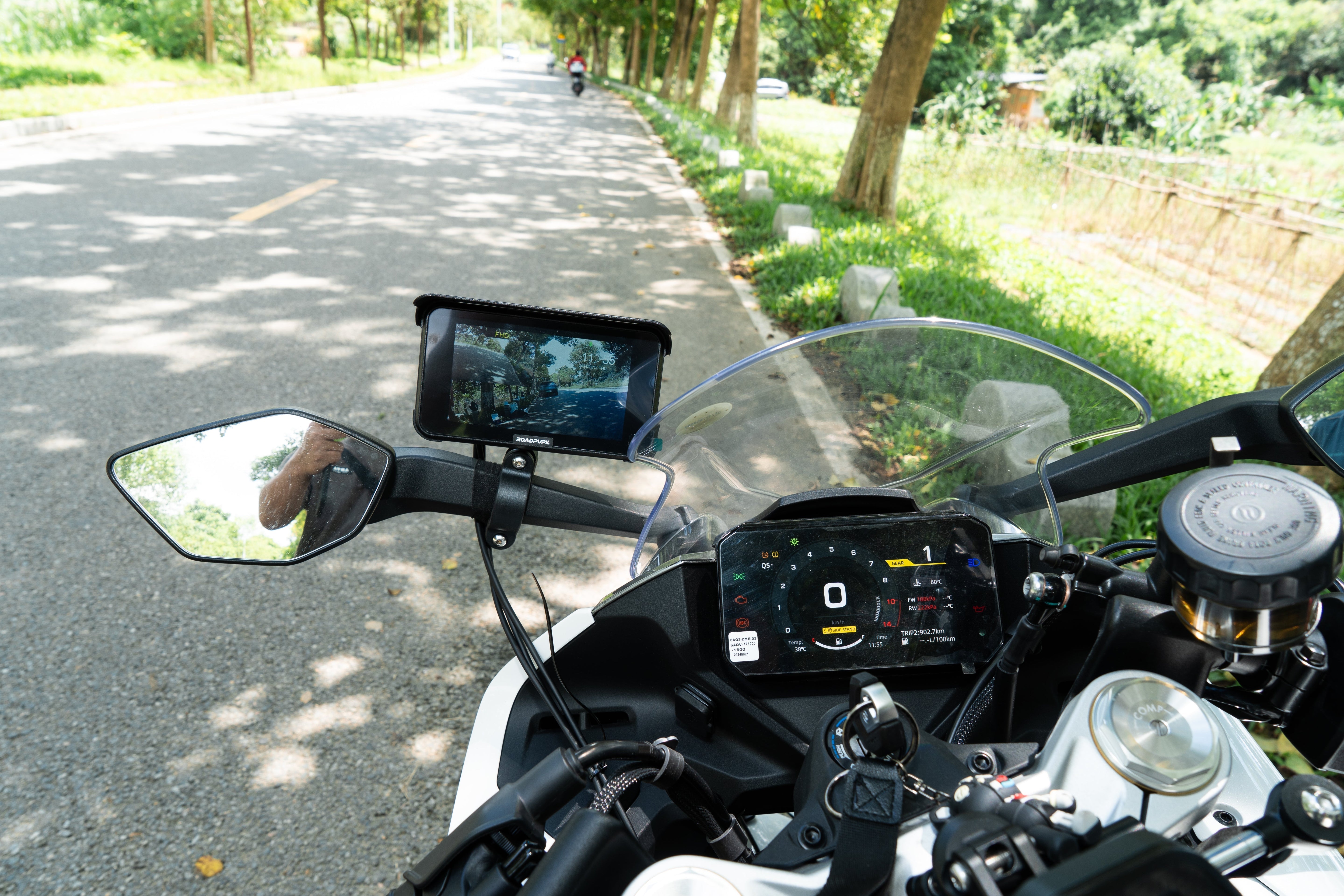
- A handlebar-mounted or cockpit-mounted display
- A compatible iPhone
- Bluetooth and Wi-Fi connectivity
- A stable motorcycle power connection
- An optional helmet headset or intercom for audio
The word “wireless” refers to the connection between the phone and the display. The display itself usually still needs to be connected to the motorcycle’s electrical system or another suitable power source.
How Does Wireless CarPlay Work on a Motorcycle?
After the initial pairing process, a compatible motorcycle display uses Bluetooth and Wi-Fi to connect with the iPhone. When the motorcycle and display are powered on, the system may reconnect automatically, depending on the display, phone settings, and installation.
The typical process looks like this:
- Turn on the motorcycle and power the display.
- Bluetooth helps the phone and display recognize each other.
- Wi-Fi supports the active wireless CarPlay connection.
- Compatible CarPlay apps appear on the motorcycle display.
- Audio can be routed through a compatible helmet headset, intercom, or other supported audio device.
The iPhone continues to provide GPS, mobile data, apps, and many of the connected functions. That means features such as live traffic, music streaming, calls, and messaging may still depend on mobile coverage and the apps being used.
Offline navigation may remain available when the chosen map app supports downloaded maps. However, live traffic, cloud-based searches, streaming audio, and real-time updates normally require an internet connection.

What Can You Do With Motorcycle CarPlay?
The main purpose of a motorcycle CarPlay screen is to place frequently used riding functions on a dedicated display without requiring the iPhone to remain exposed on the handlebars.
Navigation
Compatible navigation apps can show route guidance, upcoming turns, estimated arrival information, and other supported map details. The available functions depend on the app, region, phone, and CarPlay implementation.
Calls and Messages
CarPlay can support calls and compatible messaging functions. Siri may be used for supported voice commands, which can reduce the need to type or manually search through the phone.
Music, Podcasts, and Audio
Compatible audio apps can be accessed through the CarPlay interface. The actual sound output depends on how the phone, display, and helmet communication system are connected.
Siri Voice Control
Siri can help with supported navigation, calling, messaging, and audio tasks. Voice control is most useful when the microphone, helmet headset, phone settings, and wireless connections are configured correctly.
Helmet Headset Connection
Some riders connect the phone directly to a helmet intercom, while other setups may route audio through the display or use a separate pairing arrangement. Check the instructions for the individual CarPlay display and helmet communication system before buying.
Riders comparing a modular display-and-intercom setup with a more integrated helmet solution can also read our motorcycle smart helmet guide.
Wireless CarPlay vs a Phone Mount vs an Integrated System
There is no single best setup for every rider. The right choice depends on ride length, navigation frequency, installation preferences, recording needs, and budget.

| Setup | Main Advantages | Main Limitations | Best For |
|---|---|---|---|
| Phone mount | Simple, low initial cost, uses the phone directly | Phone remains exposed and must be mounted before riding | Short or occasional rides |
| Dedicated CarPlay display | Phone can stay stored away, dedicated navigation interface | Requires installation, power, and enough cockpit space | Frequent navigation, commuting, and touring |
| CarPlay and dash cam system | Combines navigation, connectivity, and ride recording | More components and a more involved installation | Riders wanting an integrated electronics setup |
A phone mount may still be enough when navigation is only used occasionally. A dedicated screen becomes more practical when maps and phone connectivity are part of the normal riding routine.
Riders who also want continuous road recording can compare how a motorcycle dash cam with Wireless CarPlay or HiCar combines navigation, connectivity, and recording in one system. For a broader explanation of camera layouts, power, weather resistance, and everyday recording, read the Motorcycle Dash Cam Guide (2026).
Main Benefits of Wireless CarPlay for Riders
Navigation Is Easier to Check at a Glance
A dedicated display can keep route guidance in a consistent position instead of requiring the rider to mount and remove a phone before every trip. The benefit depends on choosing a mounting position that does not block the motorcycle’s gauges, controls, or normal field of view.
The Phone Can Stay Better Protected
Keeping the iPhone in a pocket, jacket, or tank bag can reduce its direct exposure to rain, dust, strong sunlight, and handlebar vibration. Riders also avoid repeatedly attaching and removing the phone from a mount.
There Is Less Setup Before Each Ride
Once pairing, mounting, and power are configured correctly, the display may reconnect automatically when the motorcycle starts. This can make regular commuting and navigation more convenient.
The Cockpit Can Feel More Organized
A dedicated display may reduce the number of separate devices and loose charging cables around the handlebars. This is especially useful when the rider already uses a phone, navigation system, camera, tire monitor, or helmet intercom.
It Can Support a More Integrated Riding Setup
Some systems focus only on CarPlay and navigation. Others combine navigation with recording, GPS ride data, or additional motorcycle electronics. The best configuration depends on whether the rider wants a simple display or a more complete system.
For a more experience-focused example, see this wireless CarPlay and motorcycle camera riding setup.
Limitations You Should Know Before Buying
Wireless CarPlay can simplify phone access, but it does not remove every cable, compatibility issue, or riding distraction.
- The motorcycle display still requires a reliable power source.
- Navigation and wireless connectivity can continue using the iPhone battery.
- Not every iPhone app is available through CarPlay.
- Live traffic, streaming, and online searches may require mobile data.
- Automatic reconnection can vary between displays and phone settings.
- Helmet audio may require an additional Bluetooth pairing process.
- The screen must still be positioned and used responsibly.
- Weather resistance, brightness, and glove operation vary by product.
Wireless CarPlay should reduce unnecessary phone handling, not encourage the rider to spend more time interacting with a screen. Route planning, pairing, and detailed settings should be completed before riding whenever possible.
Phone, App, and Helmet Headset Compatibility
iPhone Compatibility
Apple CarPlay is intended for compatible iPhones. Before buying a display, confirm that the phone model, iOS version, region, and selected product are compatible.
Android Phone Compatibility
Android phones do not use Apple CarPlay. Android users should choose a display that supports Android Auto and verify compatibility with their specific phone.
App Compatibility
CarPlay supports selected apps rather than every app installed on the phone. Navigation, audio, messaging, and calling support can vary by app, country, operating system, and product.
Mobile Data and Offline Maps
The wireless CarPlay connection itself is not the same as an internet connection. However, live traffic, streaming, cloud searches, and messaging functions can depend on mobile data. Downloaded offline maps may help in areas with weak coverage when the navigation app supports them.
Helmet Audio
Confirm how calls, navigation prompts, music, and Siri will connect to the helmet headset. Do not assume every display and intercom will use the same pairing method.
Installation, Power, and Mounting
A good motorcycle CarPlay experience depends as much on installation as it does on the screen itself.
Choose the Mounting Position
The screen should be visible without blocking the speedometer, warning lights, mirrors, switches, or normal road view. Turn the handlebars fully left and right to check clearance before final installation.
Confirm the Power Method
Check whether the system uses USB power, an accessory circuit, a hardwired connection, or another method. Follow the product instructions and use professional installation support when the motorcycle’s electrical system is unfamiliar.
Route Cables Carefully
Keep wiring away from hot engine parts, sharp edges, moving steering components, and areas where cables can be pinched or pulled.
Check Mount Stability
The mounting system should remain secure on rough roads and during handlebar movement. Tighten hardware according to the product instructions and inspect it periodically.
Verify Weather Protection
Do not rely only on general words such as “waterproof.” Check the verified rating and instructions for the display, connectors, cameras, and external components.
What to Look for in a Motorcycle CarPlay Display
Screen size is only one part of the buying decision. Everyday reliability, installation, compatibility, and support usually matter more than a long feature list.
- Phone support: Confirm Apple CarPlay and Android Auto requirements.
- Wireless reconnection: Check how the system pairs and reconnects after startup.
- Daylight visibility: The screen should remain readable in normal riding conditions.
- Weather resistance: Review the stated rating for the complete installation.
- Mounting hardware: Check handlebar size, available space, and vibration resistance.
- Power requirements: Understand the wiring method before buying.
- Glove operation: Check whether the interface suits the gloves normally used.
- Helmet audio: Confirm compatibility with the preferred headset or intercom.
- Camera functions: Decide whether navigation alone is enough or recording is also needed.
- Support and warranty: Review installation guidance, after-sales support, and warranty terms.

RoadPupil offers both dedicated and integrated motorcycle CarPlay displays and systems. Compare the verified specifications of each model instead of assuming that every display includes the same functions.
Who Benefits Most From Motorcycle CarPlay?
A motorcycle CarPlay display is usually most useful for riders who:
- Commute regularly
- Use navigation on most rides
- Travel through unfamiliar areas
- Take long-distance or touring trips
- Ride in changing weather conditions
- Want to keep the phone off the handlebars
- Use a helmet headset for directions or calls
- Want navigation and recording in one integrated setup
It may be less important for riders who mainly take short trips on familiar roads, rarely use navigation, or prefer the lower cost and simplicity of a secure phone mount.
Is Wireless CarPlay Worth It for a Motorcycle?
Wireless CarPlay is often worth considering when navigation and phone connectivity are part of the rider’s normal routine. Its main value is not adding more technology. It is reducing the repeated process of mounting, connecting, exposing, and removing the phone before every ride.
A phone mount remains the simpler choice for occasional use. A dedicated CarPlay screen is more suitable for frequent navigation, commuting, and touring. An integrated CarPlay and dash cam system may make more sense when the rider also wants continuous front and rear recording.
The decision should be based on riding habits, phone compatibility, installation space, power requirements, helmet audio, and verified product specifications.
Riders looking for navigation and recording in one system can also review the R9 Pro Motorcycle CarPlay Dash Cam.
Compare Motorcycle CarPlay Options
Explore dedicated displays and integrated motorcycle systems based on your navigation, recording, installation, and connectivity needs.
Frequently Asked Questions
What is wireless CarPlay for a motorcycle?
Wireless CarPlay for a motorcycle connects a compatible iPhone to a dedicated riding display. It provides access to supported navigation, calling, messaging, audio, and Siri functions while the phone remains stored away.
How does wireless CarPlay connect to a motorcycle display?
Wireless CarPlay normally uses Bluetooth during connection and Wi-Fi for the active CarPlay session. After the first pairing, a compatible display may reconnect automatically when the motorcycle and display are powered on.
Does motorcycle wireless CarPlay need internet?
The phone-to-display connection does not always require internet access, but live traffic, music streaming, cloud searches, messaging, and maps that have not been downloaded may require mobile data.
Does wireless CarPlay drain the iPhone battery?
Navigation, GPS, mobile data, Bluetooth, Wi-Fi, and audio can continue using the iPhone battery. Actual battery use depends on the phone, apps, signal strength, settings, and ride length.
Is a motorcycle CarPlay screen better than a phone mount?
A CarPlay screen is often more practical for riders who use navigation frequently or want to keep the phone stored away. A secure phone mount may remain the simpler and less expensive option for short or occasional rides.
Can an Android phone use Apple CarPlay?
No. Apple CarPlay is intended for compatible iPhones. Android users should choose a motorcycle display that supports Android Auto and confirm compatibility before buying.
Does a motorcycle CarPlay display still need power?
Yes. The connection between the phone and display may be wireless, but the motorcycle display itself still requires a suitable power source.
Can motorcycle CarPlay connect to a helmet headset?
It may be possible to use navigation prompts, calls, music, and Siri with a compatible helmet headset. The pairing method depends on the phone, display, headset, and product configuration, so compatibility should be confirmed before purchase.
Keep Riding Smarter

Written by roadpupil